

Table of Contents
- The Hidden Costs of Home Printing
- Professional Printing Quality: Resolution, Color, and Paper Stock
- DIY vs Professional Invitation Printing Cost Comparison
- How to Print Professional Quality Invitations at Home (If You Must)
- The Best Paper Weight for Wedding Invitations and Other Events
- Turnaround Time, Bulk Orders, and Finishing Services
- When Professional Printing Is the Right Choice for Your Event
- Frequently Asked Questions
Last Updated: October 1, 2026
The Hidden Costs of Home Printing
That bargain printer on the shelf isn't the bargain it appears to be. The purchase price is the smallest expense you'll pay, and the money leaks out slowly through every cartridge, every ream of paper, and every jammed sheet.
This guide from The Invite Lady breaks down the real math behind why choose professional printing over home printers for the invitations that matter most. We've helped families celebrate since 2009, and we've watched too many hosts discover the hard way that a home printer costs more than it saves.
Ink, Paper, and Hardware Depreciation
Inkjet printers sell cheap because the ink is where the profit lives. Manufacturers price hardware low and make it back on cartridges that hold a few milliliters of ink.
A common mistake is buying a printer based on the sticker price alone. In practice, the ongoing costs stack up fast:
- Replacement ink cartridges, often costing a large share of the printer's original price
- Specialty paper that feeds reliably and holds color without smearing
- Replacement print heads when nozzles clog from infrequent use
- Electricity and the value of your own time troubleshooting
Printers also wear out. Feed rollers harden, print heads dry out between uses, and firmware updates sometimes lock you into specific cartridge brands. That's hardware depreciation working against you.
Cost-Per-Print vs Cost-Per-Card
The number that actually matters is cost-per-print, not cost-per-printer. When you divide the total spend by the number of usable cards you get, home printing rarely wins for small runs.
Many businesses and event hosts find that a single ruined batch, caused by a clogged nozzle or a paper jam mid-run, wipes out any savings. You're not just paying for ink. You're paying for reprints, wasted paper, and the afternoon you lost fixing the machine.
A Total Cost of Ownership Framework You Can Run Yourself
Most comparisons stop at the cartridge price. The real number is total cost of ownership (TCO), and you can estimate it before you buy anything. Add up these five buckets over the life of the project, then divide by the number of usable cards:
- Hardware, amortized. Take the printer price and divide it by the number of print jobs you realistically expect before it dies or you replace it. A printer used twice a year carries a much higher per-job hardware cost than one used weekly.
- Consumables per page. Ink or toner, plus the paper itself. Specialty cardstock costs far more per sheet than plain paper, and heavy stock that jams wastes both the sheet and the ink already laid down.
- Maintenance and replacement parts. Print heads, maintenance kits, feed rollers, and cleaning cycles. Inkjet cleaning cycles consume ink even when you print nothing, so a printer that sits idle still drains cartridges (How Long Does Printer Ink Last If You Don't Print Often?).
- Waste and reprints. Every misfeed, color shift, or smeared sheet is a full loss. Double-sided printing doubles the loss on a single jam.
- Your time. Troubleshooting, re-running jobs, and trips to buy supplies are real costs even when they don't show up on a receipt.
A simple pattern emerges: the fewer cards you print and the more often the printer sits idle, the worse home printing looks on a TCO basis.
Run the TCO math before you commit. If your per-card cost after hardware, ink, maintenance, waste, and time is anywhere near a professional per-card price, the professional option wins on consistency alone.
Professional Printing Quality: Resolution, Color, and Paper Stock
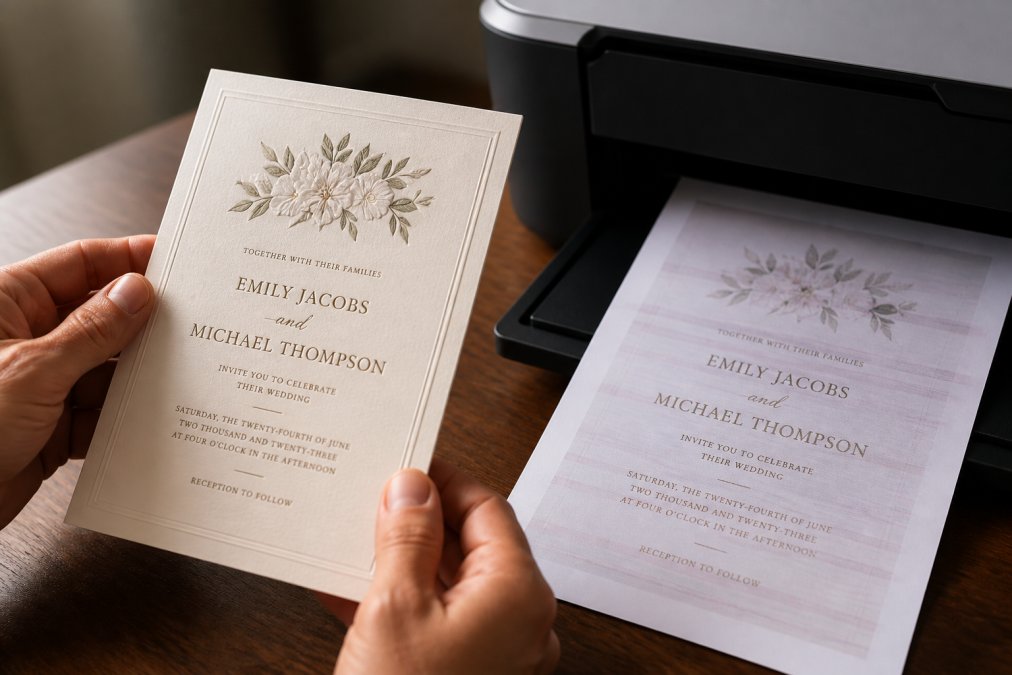
Professional printing delivers sharper resolution, more accurate color, and heavier paper stock than any typical home printer can match. That gap shows up most clearly on invitations, where the paper is handled, displayed, and kept.
DPI, Color Calibration, and Output Consistency
DPI measures how many dots of ink fit into a single inch of printed output. Higher DPI means finer detail and smoother gradients. Commercial presses print at far higher resolutions than the typical home inkjet, which is why fine script and small serif fonts stay crisp instead of turning muddy.
Why Your Screen and Your Printer Disagree: ICC Profiles Explained
This is the part most comparisons skip, and it's the reason a design that looks perfect on your monitor can come back from a home printer looking wrong.
Home printing usually breaks this chain in three places:
- Uncalibrated monitors. Most consumer screens ship with brightness and color settings tuned to look punchy in a store, not accurate in a room. Without hardware calibration, what you see is an approximation, not a reference.
- Missing or generic paper profiles. Every paper stock absorbs ink differently. Professional workflows pair a specific printer with a specific paper profile. A home printer often has one generic setting for "photo paper" that fits nothing precisely.
- No soft proofing. Professional designers preview how a file will look on the final paper before printing. Most home users have no way to simulate that, so surprises only appear after the ink is down.
If you're designing at home, work in a consistent color space and ask your printer what profile they recommend for the paper you've chosen. Sending a file with the right profile removes most of the guesswork.
Baby It's Cold Outside Baby Shower →
Paper Stock, Weight, and Finish
Resolution and color only matter if the paper can carry them. Professional presses handle heavier stocks, textured finishes, and specialty substrates that a desktop printer simply cannot feed. Heavier paper holds ink without show-through, feels substantial in the hand, and takes finishes like soft-touch coating or letterpress impressions that a home printer can't produce at all.
DIY vs Professional Invitation Printing Cost Comparison
The DIY vs professional invitation printing cost comparison usually surprises people. Home printing looks cheaper up front, but the true cost per card tells a different story once you factor in ink, paper, and reprints.
| Factor | Home Printing | Professional Printing |
|---|---|---|
| Upfront cost | Printer plus ink and paper | Per-card price, no hardware |
| Cost-per-print | Rises with each reprint | Fixed per card |
| Color accuracy | Drifts between batches | Calibrated and consistent |
| Paper stock | Limited to what feeds | Wide range, heavy weights |
| Turnaround | Depends on your schedule | Set production time |
| Reprints | Your cost and time | Handled by the printer |
How to Print Professional Quality Invitations at Home (If You Must)
If you're set on printing at home, you can get closer to professional results with the right setup. It won't match a commercial press, but it can look respectable.
Choosing the Right Printer and Settings
Start with a printer built for photo or cardstock printing, not a basic document printer. Then adjust these settings:
- Set print quality to the highest DPI available
- Select the correct paper type so the printer adjusts ink output
- Choose "borderless" only if your design accounts for bleed and trim
- Print a single test card before running the full batch
- Let ink dry fully before stacking or mailing
Print a test card on the exact paper stock you plan to use, not plain paper. Ink absorbs differently on textured cardstock, and colors can shift noticeably between a cheap test sheet and your final paper.
The Best Paper Weight for Wedding Invitations and Other Events
The best paper weight for wedding invitations and other formal events falls between 100 and 130 pounds of cardstock, heavy enough to feel substantial without jamming a home printer. Weight signals quality the moment a guest picks up the envelope.
Turnaround Time, Bulk Orders, and Finishing Services
Turnaround time is where planning ahead pays off. Professional printers quote a set production window, and bulk orders often move faster per unit because setup is spread across the whole run.
When Professional Printing Is the Right Choice for Your Event
Professional printing is the right choice when your event matters enough that the invitation sets the tone. Weddings, milestone birthdays, baby showers, graduations, and religious milestones all fall into that category.
Ask yourself three questions:
- Will guests keep this card, or toss it after the date?
- Does the design rely on color accuracy or fine detail?
- Do I want to spend my prep time at a printer, or with my guests?
Frequently Asked Questions
Is professional printing better quality than home printing?
Professional printing uses commercial-grade presses with higher resolution, consistent color calibration, and premium paper stocks. Home printers typically max out at lower DPI and struggle with heavy cardstock, often producing banding, faded colors, or smudges. Professional printing also offers finishing services like bleed and trim, proofing, and archival-quality inks that home printers cannot match.
Can home printers handle heavy cardstock for wedding invitations?
Most home printers can only handle paper up to 80-100 lb cover weight, and even then, feeding issues and jams are common. The best paper weight for wedding invitations is typically 110-130 lb cover, which requires a professional press. Attempting thick cardstock at home often leads to misfeeds, ink smearing, and damaged print heads.
What are the cost benefits of using a professional printing service?
A DIY vs professional invitation printing cost comparison shows that home printing hides costs in ink, paper, hardware depreciation, and wasted supplies from trial and error. Professional printing offers a clear cost-per-card, often starting at $1.95 per invitation, with no hidden maintenance or replacement costs. Bulk orders also lower the per-unit price.
When should you choose professional printing over DIY?
Choose professional printing for events with more than 20 guests, when you need specific paper stock, finishing, or color accuracy, or when turnaround time matters. For a small, casual gathering, home printing may suffice if you have a high-quality printer and accept the limitations. For weddings, baby showers, and graduations, professional printing ensures a polished result.
Your event deserves an invitation that looks as considered as the celebration itself. Home printing can work for casual notices, but for the moments you'll remember, the details matter. The Invite Lady brings personalized designs, per-card ordering flexibility, and printed invitations that arrive ready to send, backed by a team that's been helping hosts celebrate since 2009. Get started with The Invite Lady and send stationery your guests will want to keep.