

Last Updated: October 23, 2026
Quick Summary
To design professional event invitations, begin by defining your event theme and tone, then choose typography, colors, and visual hierarchy that reinforce your message. Include all essential information like date, time, location, and RSVP details, presented clearly with sufficient contrast for readability across print and digital formats.
- Send formal invitations 6-8 weeks before your event and casual invitations 3-4 weeks in advance.
- Use no more than three fonts total, with headlines at 28-48 points and body text at 14-18 points for printed invitations.
- Ensure 300 DPI resolution minimum for print and use CMYK color mode to prevent color shifts during production.
- Include essential information: event name, date, time, location, dress code, RSVP deadline, and contact details.
- Design digital invitations for mobile-first viewing with single-column layouts and tap-friendly buttons at least 44x44 pixels.
Table of Contents
- Define Your Event Theme and Tone
- Choose Typography and Fonts That Match Your Event
- Select a Color Palette and Visual Hierarchy
- Include Essential Information and Event Invitation Wording Examples
- Best Tools for Designing Invitations
- When to Send Event Invitations and Event Invitation Etiquette
- Design for Digital and Print: Format, Resolution, and Accessibility
- Optimize for Mobile and Post-Invitation Follow-Up
- Frequently Asked Questions
Define Your Event Theme and Tone
When you design professional event invitations, begin by understanding what your event is really about. The tone and visual direction you choose will guide every design decision that follows, from typography to color selection to the words you use.
Start by asking yourself: What feeling do you want guests to have when they open the invitation? A milestone birthday celebration calls for a different energy than a formal corporate gala. A casual garden party needs different visual language than a black-tie wedding.
Document your event's core characteristics. Is it formal or casual? Elegant or playful? Traditional or modern? Are you celebrating something nostalgic, or something fresh and contemporary? Write down three words that capture the vibe you're after.
The tone of voice in your invitation copy should match your visual theme. Formal events use more structured language and traditional phrasing. Casual celebrations can be warm, conversational, even humorous. The visual hierarchy and design elements should reinforce that tone, not contradict it.
Choose Typography and Fonts That Match Your Event
Typography is not decoration, it's one of your primary communication tools. The fonts you select tell guests something about your event before they read a single word.
Serif fonts (like Garamond, Baskerville, or Times New Roman) feel traditional, elegant, and formal. They work beautifully for weddings, formal galas, and classic celebrations.
When designing professional event invitations, choose a primary font for headlines and a complementary font for body text. The two should contrast enough to be visually distinct but share a similar formality level.
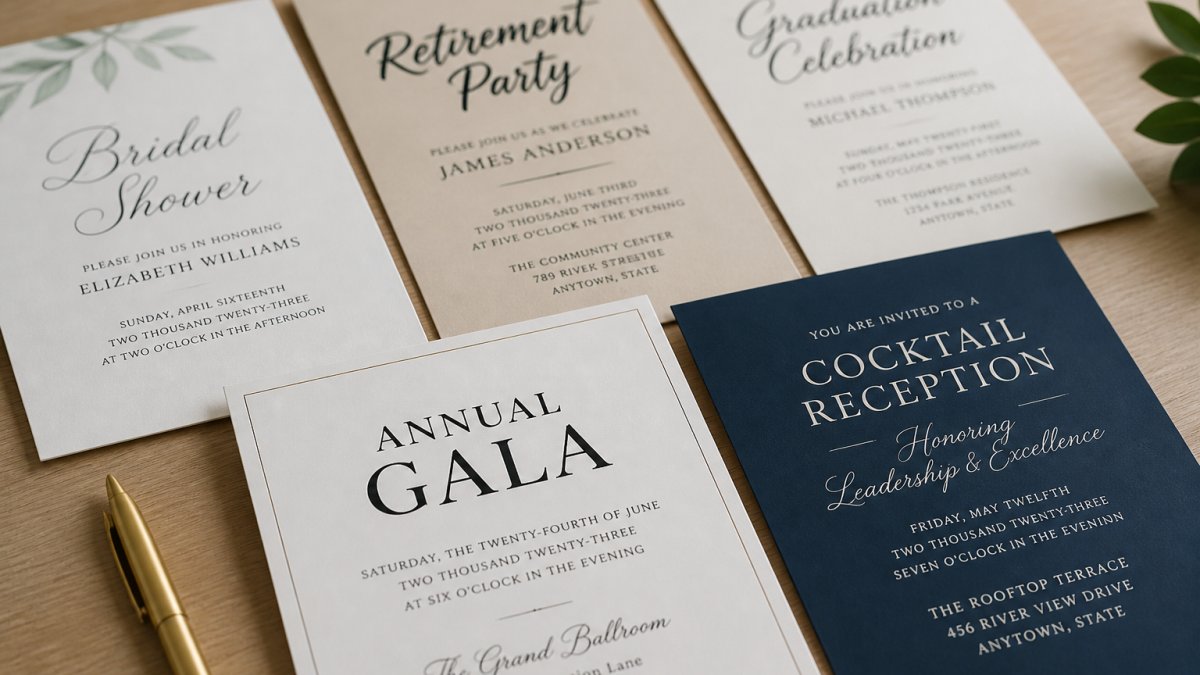
Font size matters. Headlines should be large enough to command attention, typically 28-48 points. On digital invitations, consider that people may view on mobile devices, so legibility becomes even more critical.
Avoid using more than three fonts in a single design. Two is often ideal: one for hierarchy (headlines) and one for body text. If you're using templates, the font pairings are often optimized for readability and visual balance, which can eliminate this decision entirely.
Select a Color Palette and Visual Hierarchy
Color is one of the most powerful tools in invitation design. It sets the emotional tone, guides the reader's eye, and makes your invitation memorable.
Start by choosing 2-3 primary colors that align with your event theme. If you're designing professional event invitations for a formal wedding, you might choose navy and gold. For a cheerful baby shower, pastels and bright accents work well. For a corporate event, consider your brand colors if one exists.
Visual hierarchy determines what guests see first, second, and third. The most important information, your event name or date, should be largest and positioned prominently. Secondary information (time, location) comes next in size and prominence.
Use contrast to create hierarchy. Contrast comes from differences in size, color, weight (bold vs. regular), and positioning. A large headline in your primary color naturally draws attention before smaller body text in a neutral shade.
Color psychology matters more than most people realize. Warm colors (red, orange, gold) feel celebratory and energetic. Cool colors (blue, green, purple) feel calm and sophisticated. Neutral colors (black, white, gray, beige) feel elegant and timeless.
Ensure sufficient contrast between text and background for readability. Dark text on light backgrounds or light text on dark backgrounds works best.
Include Essential Information and Event Invitation Wording Examples
Every professional event invitation must include specific information. Missing details create confusion and lead to lower attendance.
Essential information includes:
- Event name or type (Wedding Reception, Baby Shower, Graduation Party, etc.)
- Date and day of the week
- Time (start and end time if applicable)
- Location (venue name and full address)
- Dress code (if applicable)
- RSVP deadline and contact information
- Any special instructions (dietary restrictions form, parking information, etc.)
The way you present this information affects how guests perceive your event. Formal invitations typically use full dates ("Saturday, June 15th, 2026") and complete venue addresses. Casual invitations can be more relaxed ("Saturday, June 15 at 6 PM" or "Come celebrate with us").
Here's a formal wedding invitation example:
"Together with their parents, [Couple Names] request the honor of your presence at the marriage of [Bride Name] to [Groom Name]. Saturday, the fifteenth of June, two thousand twenty-six, at four o'clock in the afternoon, [Venue Name], [City, State]."
Here's a casual celebration example:
"You're invited to celebrate [Person's Name]'s 30th Birthday! Saturday, June 15th at 6 PM. Join us for drinks, dinner, and dancing at [Venue Name]. RSVP by June 1st to [contact info]."
The Invite Lady offers templates with invitation copy for every event type. You can customize the wording while keeping the structure that works best for your specific celebration.
The Night Before Bridal Rehearsal Invitation with Envelopes →
Best Tools for Designing Invitations
When you're ready to design professional event invitations, you have several options. DIY design platforms like Canva offer free templates and drag-and-drop interfaces. The learning curve is minimal, but the results often look generic because thousands of other events use the same templates.
Professional design software like Adobe InDesign or Illustrator gives you complete control but requires technical knowledge and a steep learning curve. You're paying for software, not for the finished product.
The Invite Lady offers professionally designed templates that are customizable without requiring design expertise. You choose your design, personalize it with your event details, and order printed cards or digital files.
The advantage of working with pre-designed templates is that the typography, color palette, and layout are often optimized by designers. Your personalization focuses on content (names, dates, wording) rather than struggling with design fundamentals. For most people planning an event, this can be a fast path to a professional result.
When to Send Event Invitations and Event Invitation Etiquette
Timing affects RSVP rates and guest attendance. Send formal invitations 6-8 weeks before your event. This gives guests adequate notice for travel planning and schedule coordination. For casual events, 3-4 weeks is sufficient.
Save-the-date announcements can go out 3-4 months in advance for major events like weddings. These alert guests to hold the date before formal invitations arrive with full details.

RSVP deadlines should be 2-3 weeks before your event. This gives you time to finalize headcounts with caterers and venue coordinators. Always include the deadline clearly on your invitation.
Event invitation etiquette includes a few key principles. Use guests' proper names and titles unless you're very close to them. Include a response method that's easy for guests (RSVP email, phone number, or online form).
For formal events, printed invitations remain the standard. For casual events, digital invitations are increasingly acceptable. The Invite Lady offers both options, so you can choose based on your event's formality level and your guests' preferences.
Design for Digital and Print: Format, Resolution, and Accessibility
Professional event invitations must work across different formats and platforms. Understanding the technical requirements prevents costly reprinting mistakes and ensures your digital invitations display properly on all devices.
For printed invitations, work in CMYK color mode (cyan, magenta, yellow, black), which is the standard for print production. RGB (red, green, blue) is for screens only and will produce different colors when printed.
Print specifications matter. Standard invitation sizes are 5x7 inches or 4x6 inches. Provide a bleed (extra space around the edges that gets trimmed) of 0.125 inches to prevent white borders. Your designer should include this.
For digital invitations, use RGB color mode and 72 DPI resolution. File formats should be JPG or PDF for email distribution. Ensure your design is responsive, meaning it displays properly on phones, tablets, and desktop screens.
Accessibility in design ensures all guests can read your invitation. Use sufficient contrast between text and background. Avoid relying solely on color to convey information (for colorblind guests).
Optimize for Mobile and Post-Invitation Follow-Up
Most people will view your digital invitation on a mobile device first. Buttons and links should be large enough to tap easily (minimum 44x44 pixels) (Understanding Success Criterion 2.5.5: Target Size | WAI).
Post-invitation follow-up is where many event planners lose momentum. Send a reminder email 2 weeks before the event to guests who haven't RSVP'd yet. Send another reminder 1 week out.
For printed invitations, consider including a reply card or providing clear RSVP instructions. Digital invitations should link directly to an RSVP form or email address. The easier you make it to respond, the higher your response rate.
After the event, send thank-you notes to guests. This completes the experience and shows appreciation. It also gives you a reason to maintain contact with people you've celebrated with.
When designing professional event invitations, remember that the invitation is the first impression guests have of your event. It sets expectations, communicates essential information, and creates anticipation.
Planning an event involves dozens of decisions, and the invitation is one of the most visible. Whether you need save-the-date cards like our Watercolor Ombre Sage Green Save the Date Cards or formal rehearsal invitations like our Night Before Bridal Rehearsal Invitation with Envelopes, we offer flexible ordering and professional designs that make your celebration unforgettable.

Frequently Asked Questions
What information must be included on a professional event invitation?
Every professional event invitation needs the event name, date, time, location with full address, dress code (if applicable), RSVP details with deadline, and host contact information. Include parking or directions if helpful. For formal events, add accommodation suggestions. Digital invitations should include a clickable map link. Save-the-date cards like The Invite Lady's Watercolor Ombre Sage Green Save the Date Cards announce the date first, then the formal invitation follows with complete details.
How far in advance should you send professional event invitations?
Send formal invitations 6-8 weeks before the event to allow guests adequate planning time. For destination events, send 8-12 weeks ahead. Save-the-date cards should go out 3-4 months prior so guests can block their calendars. Casual events need 2-4 weeks' notice. Always build in a 2-3 week RSVP window before your final headcount deadline. This timing respects guest schedules and gives you sufficient time to arrange catering and logistics.
What's the difference between designing for print and digital invitations?
Print invitations require CMYK color mode, 300 DPI resolution, and bleed specifications (usually 0.125 inches). Digital invitations use RGB color and 72 DPI. Print designs must account for physical paper texture and fold lines; digital designs need mobile responsiveness and clickable elements. Print invitations feel more formal and personal, while digital invitations offer tracking, easy RSVP links, and instant delivery. Consider your audience: formal events typically favor print, while casual or large-scale events benefit from digital options.
How do I ensure my invitation design is accessible and readable?
Use high contrast between text and background (minimum 4.5:1 ratio for readability). Choose sans-serif fonts at 12 points or larger for body text. Avoid placing text over busy imagery. Ensure color isn't the only way to convey information. Test your design on mobile screens to confirm text doesn't shrink below readable size. Include alt text on digital invitations. For printed invitations, use matte finishes to reduce glare. These accessibility practices benefit all guests, not just those with visual impairments, and improve overall invitation effectiveness.
