

Table of Contents
- Canva vs Professional Invitation Printing: A Practical Comparison
- Design Flexibility and Customization Options
- Canva Print Quality and What to Expect
- Matte vs Glossy Cardstock for Invitations: Choosing the Right Finish
- Invitation Printing Cost: Breaking Down the True Expense
- How to Prepare Invitation Files for Printing Successfully
- When to Choose Professional Printing Over DIY Design
- Frequently Asked Questions
Last Updated: October 12, 2026
Canva vs Professional Invitation Printing: A Practical Comparison
When you're planning an event, the invitation sets the tone.
At The Invite Lady, we've helped thousands of customers celebrate life's moments, from baby showers to weddings to milestone birthdays. The real question isn't which option is objectively "better", it's which fits your design comfort level, timeline, budget, and quality expectations.
This guide covers the practical trade-offs between Canva and professional invitation printing services, design flexibility, print quality, costs, and the technical details that separate a great invitation from one that disappoints.
Design Flexibility and Customization Options
Canva gives you immediate creative control.
Professional printing services vary: some offer online templates similar to Canva, while others provide hands-on design.
The key difference: Canva puts the design burden entirely on you, designer, decision-maker, and quality control.
If you're comfortable with design and want maximum creative freedom, Canva wins. If you'd rather have expert guidance and a polished result without the learning curve, professional printing services are worth it.
Canva Print Quality and What to Expect
Canva is designed for digital sharing and social media, not print, so exporting from it means working with constraints professional printing software doesn't have.
Canva exports at 150 DPI by default; professional print-ready files often require 300 DPI for sharp results, especially for small text and fine details.
Color accuracy matters too. Canva displays RGB (how monitors work); professional printers often use CMYK (how ink translates onto paper).
That said, Canva's print quality is acceptable for casual invitations, especially through a print-on-demand service that handles file conversion.
Matte vs Glossy Cardstock for Invitations: Choosing the Right Finish
The finish affects how your invitation looks, feels, and photographs, an area where professional printing services shine, offering options a template tool can't replicate.
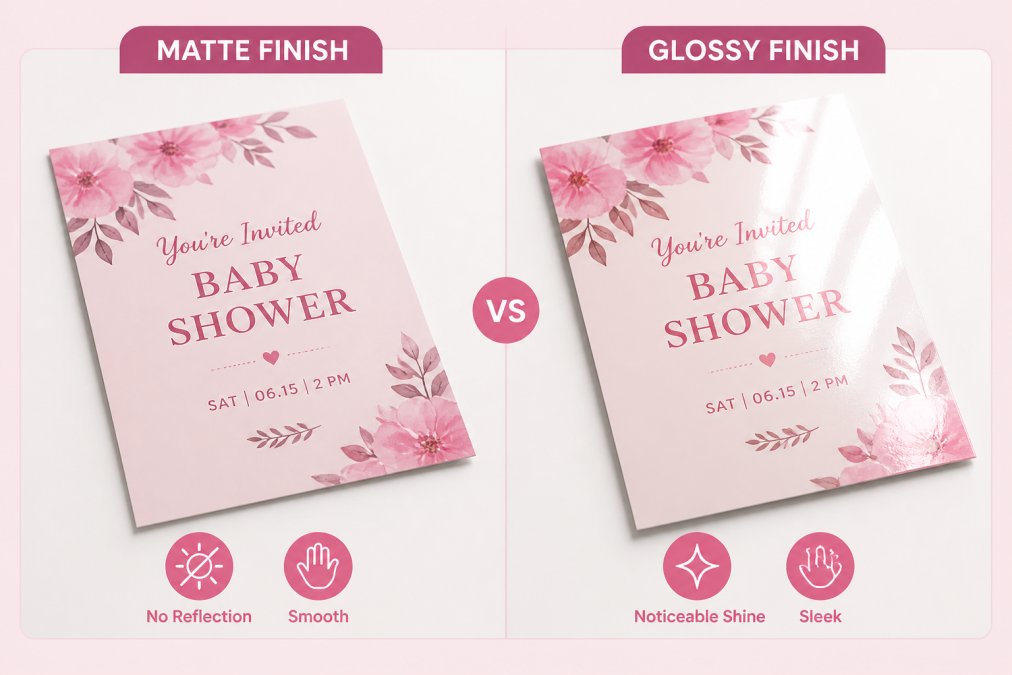
Matte finish has a flat, non-reflective surface, so text and images stay readable even in bright light. It feels sophisticated and elegant, especially for formal events like weddings, and hides fingerprints and smudges.
Glossy finish reflects light and makes colors more vibrant and saturated, so photos look richer. It's popular for casual events and colorful designs.
Paper weight: the number that actually predicts how an invitation feels
Paper weight is expressed in pounds (lb) for cardstock or points (pt) for thickness, different measurements.
- 80 lb cardstock, light and flexible. Fine for casual party invites, but it can feel flimsy and may curl in humid conditions.
- 100-110 lb cardstock, the common default for wedding and formal invitations. Substantial enough to stand up in an envelope and hold a crisp crease.
- 120 lb and up, premium weight. Noticeably rigid, photographs well, and pairs well with letterpress or foil, but costs more and may require a larger envelope or extra postage.
Specialty finishes worth knowing about
Beyond matte and glossy, professional printers often offer additional finishes:
- Linen and felt, a woven or textured surface that softens ink and hides fingerprints. Popular for traditional weddings.
- Cotton, a soft, thick, uncoated stock that takes letterpress beautifully and feels like fabric.
- Foil stamping, metallic gold, silver, rose gold, or copper applied with heat and pressure. Best on uncoated stocks; foil on glossy stock can look cheap.
- Letterpress, ink pressed into the paper, creating a debossed impression you can feel. Best on thick, soft cotton stocks.
- Embossing and debossing, raised or recessed designs without ink. Often used for monograms or borders.
- Soft-touch lamination, a velvety coating that feels like suede. Looks modern but can scuff.
- Spot UV, a glossy raised coating applied only to certain elements (a monogram, a border) over a matte base. Creates contrast.
How finish interacts with ink and envelopes
Finish isn't just about looks, it changes how ink behaves and how the invitation functions in the mail:
- Uncoated stocks absorb ink, so colors look slightly muted and text stays readable. They're also the only reliable surface for writing with a pen, which matters if guests will write on an RSVP card.
- Coated stocks (gloss, satin, soft-touch) hold ink on the surface, so colors look brighter but can scuff or fingerprint.
- Dark or heavily saturated backgrounds show scratches and handling marks far more on glossy than on matte or textured stock.
- Heavy stocks and foil can push a standard first-class envelope over the weight or rigidity limit, so check postage before you commit to a full run.
Invitation Printing Cost: Breaking Down the True Expense
This is where the math gets interesting: "cheaper" depends entirely on what you're comparing. A per-card price tells you almost nothing until you match quantity, size, paper, finish, shipping, and design work across both options.
A like-for-like framework
To compare fairly, hold these variables constant and price both paths against the same spec:
- Quantity, 25, 50, 75, or 100 invitations
- Size, A2 (4.25 × 5.5 in), A7 (5 × 7 in), or 5 × 7 in flat card
- Paper, 100 lb matte cardstock, for example
- Finish, matte, no foil, no special coating
- Printing, full color, single-sided or double-sided
- Envelopes, included or not, plain or addressed
- Shipping, standard ground, tracked
- Design labor, your hours, or a designer's fee
If any of those differ between the quotes, you're not comparing the same product.
Where the money actually goes
Canva path (design yourself, print through a print-on-demand partner):
- Template access is free or included in a subscription.
- You pay a per-card print price plus shipping.
- No minimum order in many cases, so small runs are possible.
- You supply the labor: choosing fonts, laying out text, fixing typos, exporting files, and reordering if something is wrong.
- Envelopes are often a separate line item.
Professional printing service path:
- Design may be included, templated, or charged as a setup fee.
- Pricing is often tiered by quantity, with a minimum order.
- Envelopes, addressing, and assembly are frequently available as add-ons.
- Proofing is usually built into the process.
The hidden costs that flip the comparison
- Shipping. A low per-card price can be erased by shipping on a small order. Always price shipping at your actual quantity.
- Reprints and errors. Catch a typo after a Canva order ships and you pay full price plus shipping plus the wait. Many professional services include a proof step to prevent this; ask before you order.
- Overage. Printers often ship a few extra cards to cover spoilage, usually free, but confirm the count you're quoted is the count you receive.
- Paper and finish upgrades. Moving from 80 lb to 110 lb, or adding foil or letterpress, changes the price on both paths, but only one path offers those upgrades at all.
- Rush fees. Tight timelines cost more on both sides. Ask the standard turnaround cutoff before assuming you need rush.
- Your time. Designing an invitation from scratch, even from a template, takes hours, a real cost if you'd otherwise be working.
The quantity threshold that usually decides it
For very small runs, DIY-plus-print-on-demand often wins on upfront price, with no minimum and no design fee. As quantity climbs, professional services can close the gap through tiered pricing, included envelopes, and design support.
The exact crossover depends on the service, paper, and finish.
How to Prepare Invitation Files for Printing Successfully
Whether you use Canva or a professional service, file preparation matters. A poorly prepared file can cause printing mistakes, color shifts, or unexpected cropping.
For Canva exports:
- Set your export resolution to 300 DPI. This may require manually adjusting settings before exporting.
- Export as a PDF, not an image file. PDFs preserve quality and are more predictable for printers.
- Include bleed (extra space around the edges that gets trimmed). Canva allows this, but you need to set it up intentionally.
- Check your color mode. If possible, export in CMYK rather than RGB.
- Request a sample or proof from the printer before ordering the full batch. This catches problems early.
For professional printing services:
Most handle file preparation for you, but understanding the basics helps you communicate clearly:
- Print-ready file: A file formatted specifically for printing, with proper resolution, color mode, and bleed settings.
- Proof: A digital or physical sample showing exactly what your invitations will look like. Always request one.
- Trim size: The final size of your invitation after cutting. Make sure text and images aren't positioned too close to the edges.
- Safe margin: The area where text should stay to avoid being cut off. Professional designers build this in automatically.
Professional services guide you through these steps, reducing errors. With Canva, the responsibility is on you to implement these technical details correctly.
When to Choose Professional Printing Over DIY Design
You should lean toward professional printing if any of these apply to you:
You value your time. Designing an invitation from scratch takes hours, even with templates, choosing colors, fonts, layouts, and revisions adds up. If your time is worth money, professional design saves significant hours.
Your event is formal or upscale. Weddings, milestone anniversaries, religious ceremonies, and formal celebrations benefit from professional printing's polish.
You need customization beyond templates. A photo, custom illustrations, or a design that doesn't fit standard templates, professional services can handle it.
Your timeline is tight. Professional services manage turnaround and often offer rush options.
You're ordering in quantity. For 75+ invitations, professional printing often costs less per card and delivers better quality than Canva plus print-on-demand.
You should stick with Canva if:
- You're designing for a casual event where polish matters less.
- You're ordering a small quantity and want the lowest upfront cost.
- You enjoy design and want complete creative control.
- You have time to learn file preparation and manage the printing process yourself.
Choosing between Canva and professional invitation printing comes down to what you value most: creative control and cost, or quality and expertise. Whether you're planning a baby shower, wedding, or celebration, we offer customizable designs with flexible per-card ordering, so you're not locked into minimum quantities or generic templates.
Frequently Asked Questions
How does Canva invitation print quality compare with professional printing services?
Canva's print quality depends heavily on your file resolution and the printing partner you select. Canva can output files at 300 DPI for print, which meets standard printing requirements. However, professional invitation printing services often use higher-grade cardstock, more precise color calibration, and a wider range of finishing options. For basic invitations, Canva's quality is acceptable; for events where invitations set a formal tone, professional printing often delivers noticeably better results.
Why would I pay for professional invitation printing when Canva is free?
While Canva's design tool is free, the actual printing and shipping costs can add up quickly. Professional invitation printing services like The Invite Lady offer design expertise, premium cardstock options, and finishing touches. You also avoid the hassle of uploading files, checking proofs, and coordinating with a separate printer. The value is in the finished product quality, convenience, and the ability to order exactly the quantity you need.
Can I print Canva invitations at home, and will they look professional?
You can print Canva invitations at home if you have a quality color printer and cardstock. However, home printing may not always match professional results. Home printers can struggle with color accuracy, cardstock handling, and edge-to-edge printing. The paper selection can also be limited, most home printers work best with standard weights. Professional printing services often use commercial-grade equipment that handles specialty papers and delivers consistent color across large batches.
What is the cheapest option for invitations: Canva, home printing, or professional services?
Upfront, Canva design is free, making it appear cheapest. However, when you factor in cardstock purchases, ink costs, and your time, home printing can sometimes exceed professional service costs. Professional invitation printing services offer per-card pricing that can be competitive at small quantities. The actual cheapest option depends on your quantity, desired quality, and how you value your time.